
MCP Quickstart
A free, professional, open-source financial analysis and quantitative trading MCP server. It lets you deploy a local financial MCP service with one command, using a departmental architecture that simulates a real financial firm’s operations. It supports traditional indicators, price action analysis, economic calendar, fundamentals, and news integration—providing seamless interaction with LLMs and algorithmic trading.
✨ Features
- 🚀 One-click deployment: Quickly spin up a local financial MCP service
- 🏢 Departmental architecture: Simulates real-world financial company departments
- 📊 Comprehensive analysis: Traditional technical indicators + price action analysis
- 📅 Real-time data: Economic calendar, fundamentals, and news integration
- 🤖 AI integration: Interfaces optimized for LLMs
- ⚡ High performance: Real-time streaming OHLC data processing
- 🔧 Extensible: Support for custom MCP services
GitHub
- Repository: https://github.com/aitrados/finance-trading-ai-agents-mcp
- Embed basic system function call prompt words into your LLM (e.g., LangChain): https://github.com/aitrados/finance-trading-ai-agents-mcp/tree/main/finance_trading_ai_agents_mcp/assistive_tools/basic_system_function_call_prompt_words
- Simple examples: https://github.com/aitrados/finance-trading-ai-agents-mcp/tree/main/examples
- trading agents built on LangChain https://github.com/aitrados/langchain-trading-agents
1. Installation
- Recommended (PyPI):
pip install finance-trading-ai-agents-mcp
2. Fastest path to run (Python)
Save the following as main.py and run it:
  from finance_trading_ai_agents_mcp import mcp_run
from finance_trading_ai_agents_mcp.examples.env_example import get_example_env

if __name__ == "__main__":
    get_example_env()  # write example environment variables
    mcp_run()          # start the MCP service
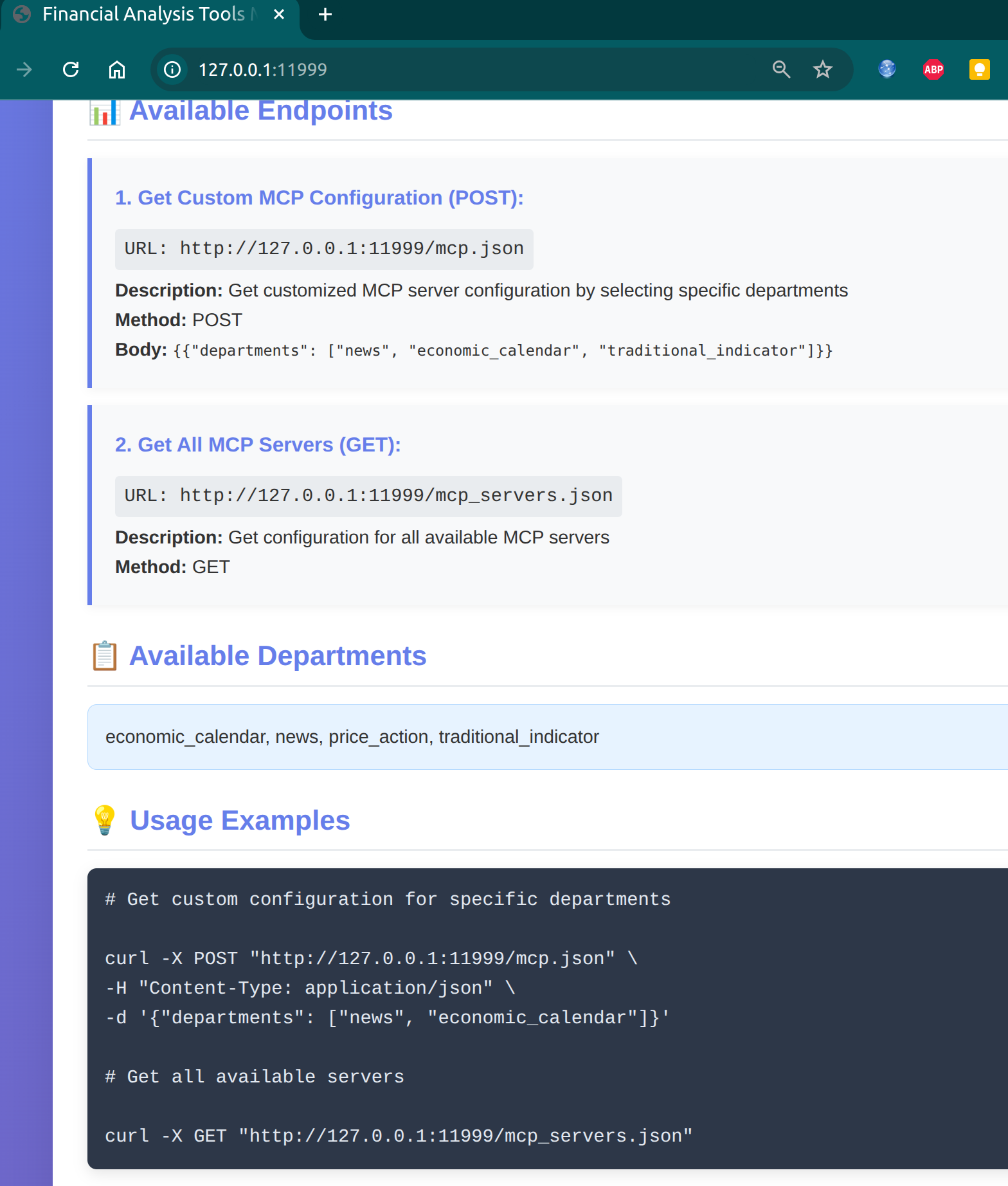
After it starts, open your browser at: http://127.0.0.1:11999/
Tip: You need a free AITRADOS_SECRET_KEY to access financial data → https://www.aitrados.com/
3. Command-line (CLI) one-liners
- Show help:
finance-trading-ai-agents-mcp --help
- Quick start (minimal config):
  # auto finding .env file
finance-trading-ai-agents-mcp

#Specify .env file path
finance-trading-ai-agents-mcp --env-file .env

finance-trading-ai-agents-mcp --env-config {"DEBUG":"1","AITRADOS_SECRET_KEY":"YOUR_SECRET_KEY"}
- Specify port:
python -m finance_trading_ai_agents_mcp -p 9000 --env-config {"DEBUG":"1","AITRADOS_SECRET_KEY":"YOUR_SECRET_KEY"}
- Use a custom MCP capability file:
python -m finance_trading_ai_agents_mcp -c examples/addition_custom_mcp_examples/addition_custom_mcp_example.py --env-config {"DEBUG":"1","AITRADOS_SECRET_KEY":"YOUR_SECRET_KEY"}
4. Required environment configuration (minimal)
Create a .env file in the project root (or pass values via –env-config):
  ##debug
DEBUG=true

##Free Register at AiTrados website https://www.aitrados.com/ to get your API secret key (Free). Dataset is free currently.
AITRADOS_SECRET_KEY=YOUR_SECRET_KEY

##Enable RPC/PubSub Service.you can cross process/software/code language communication.easily call api /websocks/other service
## see https://docs.aitrados.com/en/docs/api/trade_middleware/overview/
ENABLE_RPC_PUBSUB_SERVICE=true

##LIVE_STREAMING_OHLC_LIMIT:Real-time OHLC data stream length,default 150
##Prevent the strategy result from not being obtained due to insufficient ohlc length. For example, the value of MA200 can only be calculated when the length of ohlc is greater than 200.
LIVE_STREAMING_OHLC_LIMIT=149

#MCP LLM Setting

##OHLC_LIMIT_FOR_LLM :Due to the window context size limitations of the Large Language Model (LLM), please set a reasonable number of OHLC rows. This setting will only affect the output to the LLM and will not influence strategy calculations
##If it is a multi-period chart analysis, the OHLC_LIMIT_FOR_LLM adjustment is smaller
OHLC_LIMIT_FOR_LLM=30
##You can modify the ohlc column names to suit your trading system. Mapping example:name1:myname1,name2:myname2
RENAME_COLUMN_NAME_MAPPING_FOR_LLM=interval:timeframe,
##OHLC_COLUMN_NAMES_FOR_LLM:Filter out redundant column names for LLM input. The column names should be separated by commas.
OHLC_COLUMN_NAMES_FOR_LLM=timeframe,close_datetime,open,high,low,close,volume
Advanced options (optional):
- LIVE_STREAMING_OHLC_LIMIT defaults to 150; if you need long-period indicators like MA200, increase it appropriately.
5. A few advanced steps (optional)
- Custom MCP services and functions:
  from finance_trading_ai_agents_mcp import mcp_run
from finance_trading_ai_agents_mcp.examples.env_example import get_example_env

if __name__ == "__main__":
    get_example_env()
    from finance_trading_ai_agents_mcp.examples.addition_custom_mcp_examples.addition_custom_mcp_example import AdditionCustomMcpExample
    AdditionCustomMcpExample()
    mcp_run()
- Reuse real-time WebSocket data + MCP simultaneously: see examples/run_mcp_examples/run_mcp_with_callback_real_time_websocks_data_example.py
6. Documentation and examples
- Full docs: https://docs.aitrados.com
- GitHub: https://github.com/aitrados/finance-trading-ai-agents-mcp
— You’re all set. Start the service and let AI and real-time financial data work seamlessly in your workflow.